 1 / 3
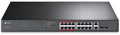
TP-Link SG1218MP 18 Port Gigabit PoE Switch
Trade account? Log in for your price
- Ports
- 16 × PoE+ + 2 × RJ45
- Uplinks
- 2 × Combo Gigabit SFP
- PoE budget
- 250 W (30 W per port)
- Management
- Unmanaged
Overview
The TP-Link SG1218MP is the big unmanaged PoE workhorse of the range: 16 Gigabit PoE+ ports with a generous 250 W total budget, two non-PoE Gigabit RJ45 ports, and two combo Gigabit SFP slots for fibre uplinks. Sixteen cameras or access points powered from one box, with no configuration or central management required.
It keeps all the surveillance-friendly extras: Extend Mode carries data and power up to 250 m for distant cameras, Priority Mode protects ports 1–4 for sensitive feeds such as video monitoring, Isolation Mode separates client traffic with one click, and PoE Auto Recovery automatically reboots any dropped or unresponsive powered device.
It pairs naturally with PoE access points such as the EAP610; for a managed switch at similar PoE scale, the Omada SG2218P adds VLANs, cloud control and more.
Key features
- 16 Gigabit PoE+ ports — up to 30 W per port for 802.3af/at devices.
- High 250 W total budget — real headroom for camera- and AP-dense sites.
- Two combo SFP slots for fibre uplinks, plus two data-only RJ45 ports.
- Extend Mode — up to 250 m of data and power for long surveillance runs.
- Priority Mode on ports 1–4 guarantees quality for sensitive video feeds.
- Isolation Mode — one-click client traffic separation for security and performance.
- PoE Auto Recovery reboots hung powered devices without a site visit.
Works with
- TP-Link SG1210MP — smaller 10-port unmanaged PoE sibling
- TP-Link Omada SG2218P — managed alternative at 16 PoE ports
- TP-Link EAP610 — Wi-Fi 6 access point it can power over PoE
- All switches
- All networking
Frequently asked questions
Can all 16 PoE ports run at full power?
Each port can deliver up to 30 W, and the shared budget is 250 W — enough for sixteen typical cameras or access points. Add up your devices' real draw when planning; most installs sit well inside the budget.
Is it managed?
No — it is unmanaged and plug and play. Extend, Priority and Isolation modes are selected on the hardware, with no software or central management required.
What are the SFP slots for?
The two combo Gigabit SFP slots take fibre modules for longer uplinks back to the core — useful when the switch sits in an outbuilding or far end of a site.
Is it suitable for CCTV?
Very — Extend Mode reaches cameras up to 250 m away, Priority Mode protects the monitoring feed, and PoE Auto Recovery restarts hung cameras automatically.
Powering a larger camera or AP estate? Call 0333 242 1314 or email sales@clisecure.com and we will size the switches, access points and PoE budget before you order.
Key features
Specifications
Interfaces
| PoE ports | 16 × Gigabit PoE+ RJ45 |
|---|---|
| Data ports | 2 × Gigabit RJ45 (non-PoE) |
| Uplinks | 2 × Combo Gigabit SFP slots |
PoE & power
| PoE standard | IEEE 802.3af/at |
|---|---|
| Per-port PoE | Up to 30 W |
| PoE budget | Up to 250 W total |
Management & features
| Management | Unmanaged, plug and play |
|---|---|
| Extend Mode | Up to 250 m data and power transmission |
| Priority Mode | High priority on ports 1–4 |
| Isolation Mode | One-click client traffic separation |
| PoE Auto Recovery | Automatic reboot of dropped or unresponsive PDs |
Product details
| Brand | TP-Link |
|---|---|
| Part number | SG1218MP |