 1 / 3
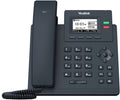
Yealink T31P SIP Desk Phone (No PSU)
Trade account? Log in for your price
- SIP accounts
- 2
- Display
- 132×64 backlit LCD
- Network
- 2 × 10/100 Ethernet
- Power
- PoE (no PSU included)
Overview
The T31P is the entry point to the Yealink desk phone range and the one to pick when the job is simply reliable calls at every desk. It registers two SIP accounts, has a large 132×64-pixel backlit mono LCD, and supports local five-way conferencing — plenty for reception desks, hot desks and back-office positions.
The P in the name means PoE with 10/100 Ethernet. If your LAN runs at gigabit and you daisy-chain the PC through the phone, step up to the T31G so the desk connection is not throttled; if the desk has no cabling at all, the T31W adds dual-band Wi-Fi.
Note the title: this unit ships without a power supply. On a PoE switch that is exactly what you want — no wasted PSUs, one less plug per desk.
Key features
- Two SIP accounts with line keys for quick switching between them.
- 132×64-pixel backlit LCD — clear caller ID and menus, easy to read at a glance.
- Yealink HD voice on handset and speakerphone for natural, wideband calls.
- Local 5-way conferencing without any PBX conference bridge.
- Built-in PoE (802.3af) — powers over the network cable from a PoE switch.
- Dual 10/100 Ethernet ports so the desktop PC can share the same wall socket.
- Wall mountable with a two-position desk stand for standard installs.
Works with
- Yealink T31G — the same phone with gigabit Ethernet
- Yealink T31W — the same phone with built-in Wi-Fi
- Yealink T33G — step up to a colour screen and 4 lines
- Headsets for Yealink desk phones
- All IP phones
Frequently asked questions
Is a power supply included?
No — this is the No PSU variant, and it genuinely ships without a power supply. Power it from a PoE (802.3af) switch port, or order a Yealink 5V PSU separately if you have no PoE.
Will it work with my hosted PBX?
Yes. The T31P is a standards-based SIP phone and is supported by virtually every hosted platform, including 3CX and BroadSoft/BroadWorks-based services. Tell us your platform and we will confirm provisioning before you order.
T31P or T31G — which do I need?
Functionally identical apart from the network ports: the T31P is 10/100, the T31G is gigabit. If a PC connects through the phone on a gigabit LAN, buy the T31G; if the phone sits alone on the port, the T31P is fine.
Can I use a headset?
Yes — there is an RJ9 headset port, so standard wired office headsets plug straight in.
Rolling out desk phones? Call 0333 242 1314 or email sales@clisecure.com and we will check the model and the cabling before you order.
Key features
Specifications
Telephony
| SIP accounts | 2 |
|---|---|
| Conferencing | Local 5-way |
| Call handling | Hold, transfer, forward, call waiting, DND, redial |
Audio
| Voice quality | Yealink HD voice, wideband |
|---|---|
| Speakerphone | Full-duplex hands-free |
| Headset port | RJ9 |
Network
| Ethernet | 2 × RJ45 10/100 Mbps (phone + PC pass-through) |
|---|
Power
| PoE | IEEE 802.3af, built in |
|---|---|
| Power supply | Not included (optional 5V PSU available) |
Display
| Screen | 2.3-inch 132×64-pixel graphical LCD with backlight |
|---|
Product details
| Brand | Yealink |
|---|---|
| Part number | T31P |
| EAN | 6938818306066 |